|
|
11-02-2012
|
1 |
|
299,792,458 m/s
Join Date: Mar 2012
Location: Lebanon
Posts: 3,581
|
How to make your GMAP using Pixel's!
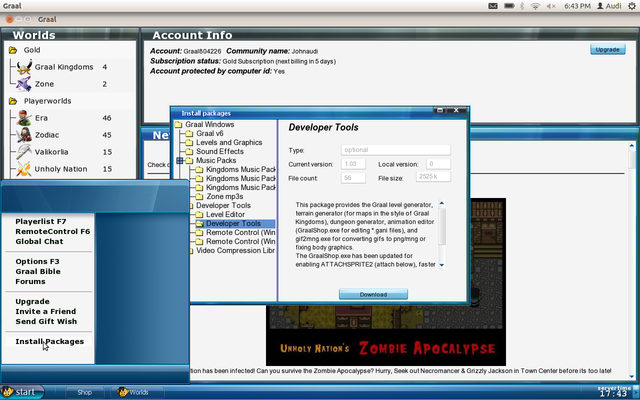
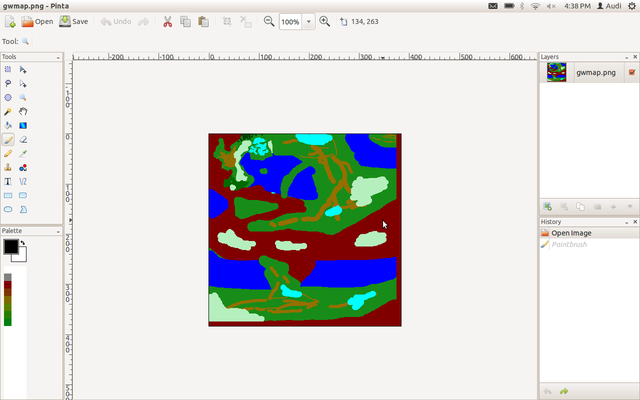
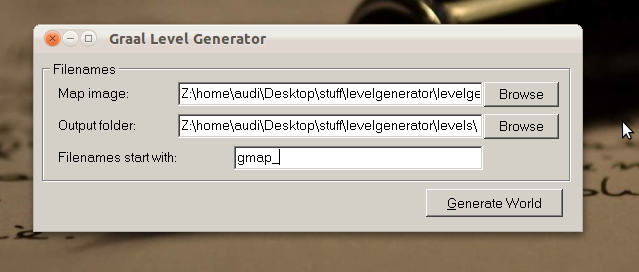
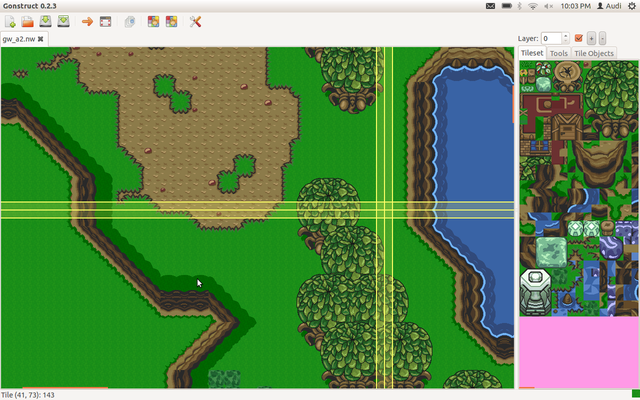
Hey guys! First time I create a thread in the Classic section, but found this pretty important for people starting a server and wanting to create a quick GMAP. So first, Go to Graal > Start > Install Packages > Developer Tools & Level Editor > Download. http://www3.picturepush.com/photo/a/11314951/640/11314951.png (Unsupported image host) Second, You'd have to open Paint / Gimp or your favorite Graphic editing tool, make an Image of a divisor of 64 (most preferable) and use the same colors for everything. Check attachment for more documentation. http://www1.picturepush.com/photo/a/11314984/640/11314984.png (Unsupported image host) Then, you'd have to run the levelgenerator by navigating to your Graal folder (usually C:/users/Username/Graal/) and find the saved image that you just created and set its save location. (Choose the name of the gmap /* I used gmap_ */) http://www2.picturepush.com/photo/a/11315005/640/11315005.png (Unsupported image host) Then you're done! Run your map via Level Editor or Gonstruct and it's ready for you to upload it to your server! http://www4.picturepush.com/photo/a/11315017/640/11315017.png (Unsupported image host) |
|
11-02-2012
|
2 |
|
Registered User
Join Date: Mar 2012
Location: New Zealand
Posts: 2,956
|
I thought this was some crazy new method, but it's just that tool. The title mislead me  . Nice guide, anyway. . Nice guide, anyway.
|